
Puzzle 059 — Find the Entrance!
Start outside the gear-wrapped building when Find the Workshop’s Entrance is active. On the puzzle board, look beside the ground-floor staircase at the lower right.
- Select the far-right red door. It has a round window, a club symbol, and a pull handle.
- Choose Submit. Once CORRECT appears, continue inside Eggmuffin’s Workshop.
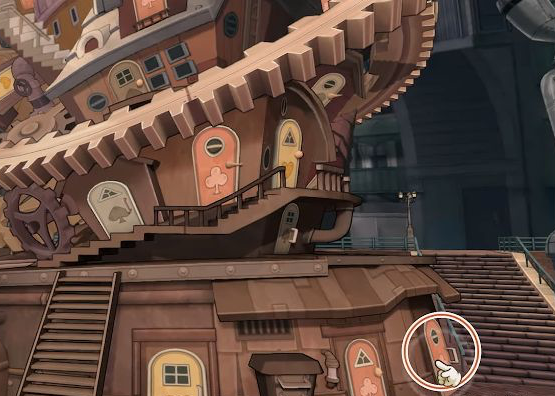
The hints point to six club symbols and nine pull handles, including the handles on the mailboxes. Only one door matches both clues, so you can find it without counting the windows. Watch the door selection.
Puzzle 060 — Find the Entrance! 2
Talk to Berg inside the workshop to reach the puzzle for Eggmuffin’s back room.
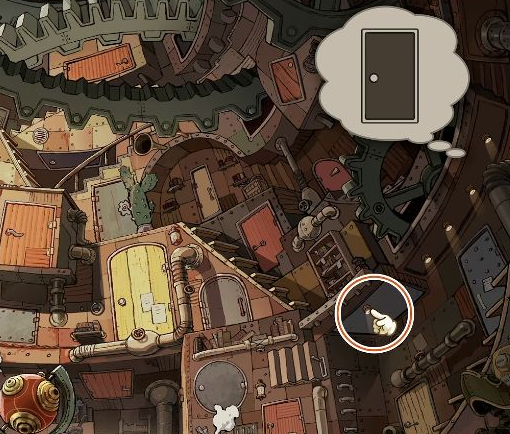
- Find the tilted dark rectangle low on the right, below the red door and above the lower orange door. It matches the shape in the thought bubble.
- Select it and choose Submit.
- After CORRECT, choose OK! at Move to Eggmuffin’s Room?
Puzzle 061 — Draw the Line
Eggmuffin asks for help with a blueprint. The output on the right reads 1, 5, 7, 3.
- Find the outlined 3 on the left of the board, beside the third track.
- Place the single cord vertically across its two open left endpoints.
- Choose Submit. The closed digit becomes an 8, and the output changes to 1, 5, 7, 8.
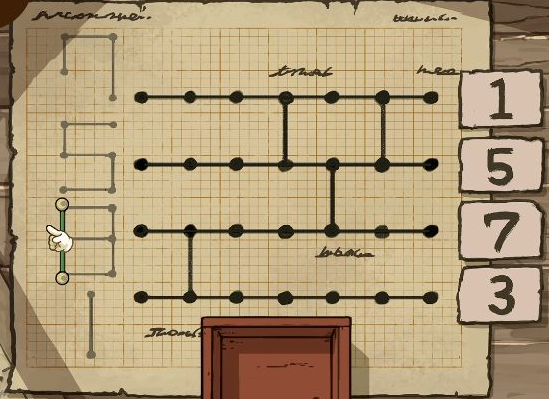
The black tracks carry digits across the board. Your cord changes the input digit before it travels. Watch the cord placement.